Capture on one machine. Read on all of them.
Stop fighting with copy and paste.
Page is one inbox every machine you own can write to. Clip a note, a link, an error, a number you need in an hour — from a terminal, a script, or an agent. It is on your phone before you have switched windows. Your agents can read it back, and answer you in it.
curl -fsSL https://a-gnt.com/page/install | sh
Three flows, one command
Now, later, or ask for input.
Everything in Page is one of these. A page you send, a page that waits, or a question that comes back answered.
Now
page "Database migration completed"
A native push on your phone, seconds later. Title, body, links, and the machine it came from.
Later
page "Call Tommy Joe's" --at 4pm
page "Review the PR" --at "tomorrow 9am"
Page holds it and delivers on time. Plain words work: 4pm, tonight, tomorrow morning, in 2h.
Ask for input
page ask "Ship the onboarding?" \
  --choices "Ship,Review,Cancel"
Blocks in the terminal until you tap an answer on your phone. Your choice prints to stdout, and the agent moves.
MCP built in
Your agent already knows what to do with it.
The install drops an MCP server next to the CLI. Register it once and "page me when the build finishes" becomes a thing you can say.
claude mcp add pager -- node ~/.local/share/pager/mcp.js
[mcp_servers.pager]
command = "node"
args = ["/home/you/.local/share/pager/mcp.js"]
- run: |
    curl -fsSL https://a-gnt.com/page/install | sh
    ~/.local/bin/page "Release failed on iOS" \
      --priority high
  env:
    PAGER_TOKEN: ${{ secrets.PAGER_TOKEN }}
> run the full migration, page me if
  anything needs a decision

Running migration (43 tables)…
Schema conflict in listings — two safe
fixes, one destructive. Paging you.

pager_ask("Schema conflict in listings.
  How should I resolve it?",
  choices: ["Rename column", "New table",
            "Stop"])

You're at dinner. Your phone buzzes once.
You tap "Rename column". In the terminal:

→ User chose: Rename column

Continuing. 43/43 tables migrated.
pager_send("Migration complete.
  Nothing lost.")
On your phone
The inbox is the product.
Reverse-chronological pages, markdown rendered properly, logs collapsed until you open them. Read the day as a timeline, or triage by the machine that paged you.
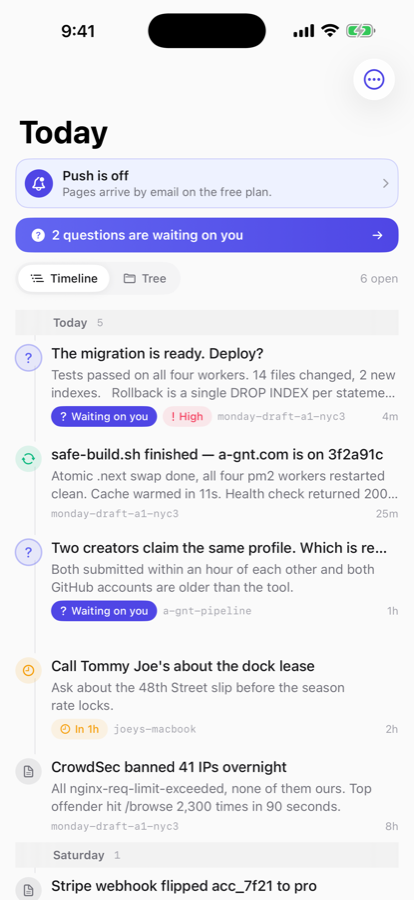
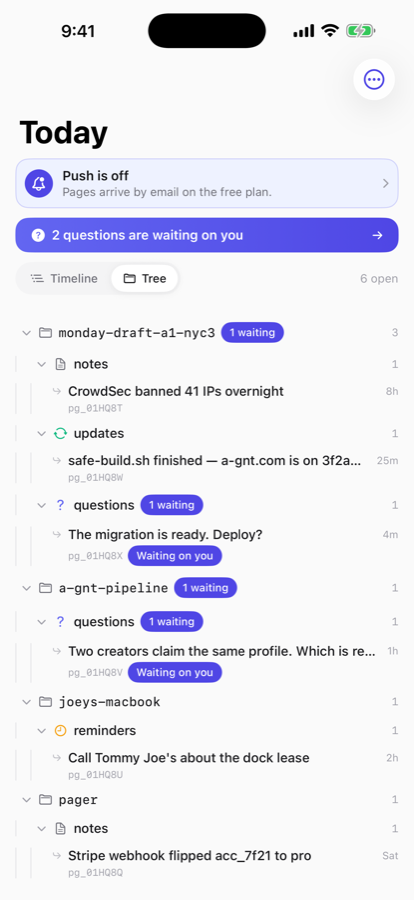
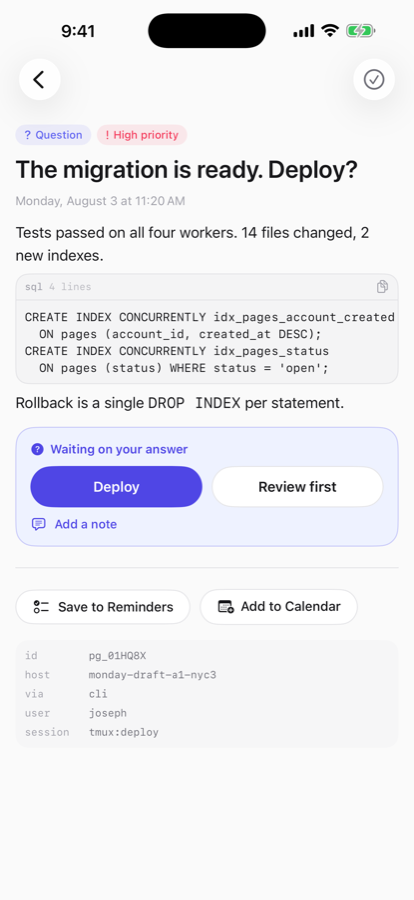
Both free to download. The inbox, the CLI, and the MCP server work today — install the CLI.
The object model
Four things your AI can hand you.
Every page is typed, so your inbox reads like a briefing instead of a feed.
Notes
Save this. A thought worth keeping that shouldn't die with the session.
page "Businesses should be nodes inside the neighborhood"
Reminders
Bring this back at nine tomorrow. Page delivers it when you said.
page remind "Fix auth refresh" --at "tomorrow 9am"
Updates
Tell me when the job finishes. Status without babysitting a terminal.
long-job && page "Training finished"
Questions
I need you to decide something. Your tap flows back to the waiting agent.
page ask "Deploy?" --choices "Ship,Review,Cancel"
Plays well with your life
Page owns the message. Apple and Google are destinations.
Your inbox stays canonical — agent questions, responses, and context can't live in a to-do app. But any page can flow outward with one tap.
Apple Notes, Reminders, and Calendar
in the iOS appEvery page in the app carries Notes, Reminders, and Calendar actions. Reminders and Calendar are handled on-device through EventKit, so nothing extra touches the server — a reminder your agent scheduled becomes a real Apple Reminder in one tap. Apple publishes no write API for Notes, so that one hands the page's text to the share sheet, where Notes is a first-party target. Same one tap, no pretending it's an integration it isn't.
Google Tasks and Calendar
on the roadmapConnect a Google account and reminders mirror into Google Tasks, scheduled pages into Calendar. Server-side OAuth, per-account, off by default. Sync is one-way by design — the page stays the source of truth, the mirror is a convenience.
Pricing
Start free. Go Pro to reach your phone.
The hosted inbox, CLI, and MCP server are free. Pro puts pages on your lock screen, in your texts, and keeps them for good.
Free
$0
- Unlimited pages from any machine or agent
- CLI, MCP server, REST API
- Scheduled delivery and blocking questions
- Email delivery to your inbox
- Pages kept 30 days. You can pin a few to keep them around longer.
- Text pages only — image attachments are Pro.
Pro
$2.99 / month
- Native push notifications in the iOS app
- Pages as text messages over SMS
- Kept forever, pinned or not
- Sign in with your phone number
- Screenshots and images attached to a page
Billing by Stripe. Cancel anytime.
Security
Specifics, not adjectives.
What Page actually does with your credentials and your data — including what it does not do.
Encrypted at rest
Page titles, bodies, and the answers you send back are AES-256-GCM encrypted in the database, with a separate random initialisation vector for every value and an authentication tag that makes tampering fail loudly. A stolen disk image or a leaked backup yields ciphertext.
Tokens are stored as hashes
The server keeps a SHA-256 hash of your API token, never the token itself. A database dump does not yield a working credential. On iPhone the token lives in the Keychain with afterFirstUnlock, so you can answer a question from the lock screen.
Sign-in tokens ride in the URL fragment
Browsers never transmit the part after #. Your token cannot end up in an nginx access log, a proxy trace, or a referrer header.
Payments verified against Apple and Stripe
App Store receipts are checked offline: full x5c certificate chain to Apple's root, leaf signature, bundle id, product id, revocation, expiry. Stripe webhooks are signature-verified. Both fail closed — an unverified receipt never grants Pro.
No trackers, no third-party SDKs
The iOS app ships with zero analytics libraries. It talks to a-gnt.com and nothing else. Login codes and magic links are rate-limited, and the host runs default-deny firewalling with CrowdSec and fail2ban.
Decrypted only to deliver
The server decrypts a page to render it into an email, an SMS, or a push notification, then it returns to ciphertext at rest. That is the trade any tool that can reach your phone makes.
Questions
What people ask before they install it.
How do I get a notification on my phone when a long build or script finishes?
Install the Page CLI and append a page call to the command: make release && page "Release finished". The message reaches your phone as a push notification, an SMS, or an email, depending on your plan. Nothing has to stay open on your desktop for it to arrive.
Can Claude Code notify me on my phone when it needs a decision?
Yes. Page ships an MCP server, so Claude Code and any other MCP-capable agent can send you a page directly. A question carries answer buttons; the agent's call blocks until you tap one on your phone, then continues with your answer.
How do I send a note or a link from one computer to another?
Page is one inbox that every machine you own can write to. Run page "note" or page "look at this" --url https://example.com from any terminal, and it shows up in the same inbox on your phone and in the web dashboard. It replaces mailing things to yourself.
Can a script wait for my answer before continuing?
page ask "Deploy?" --choices "Ship,Review,Cancel" blocks until you answer from your phone and then prints your choice, so a deploy script can pause for a human decision without anyone sitting at the keyboard.
Is there a mobile app?
Both. The iOS app is on the App Store, and the Android app is a direct APK download. Both are free. Push notifications and SMS delivery are part of Pro at $2.99 per month; the inbox and email delivery are free.
What does it cost?
Free covers unlimited pages from any machine, the CLI, the MCP server, the REST API, scheduled delivery, blocking questions, and email delivery, with pages kept 30 days. Pro is $2.99 per month and adds push notifications, SMS delivery, image attachments, and keeps every page.